
Install & Setup
Get A1R running inside Ableton Live in about 5 minutes.
A1R needs Ableton Live 11 or newer on Windows or macOS. It installs as a Control Surface (a small remote script inside Ableton) plus a lightweight standalone server you control from any browser.
- Download & run the installer. Your download link is in your license email, or on your account page.
- Open Ableton Live → Preferences (
Ctrl/Cmd + ,) → Link/Tempo/MIDI. - Under Control Surface, select A1R_MAX (or your tier's control surface). Leave Input and Output = None.
- Launch A1R from the Start menu / Desktop shortcut. It lives in the tray and doesn't have to wait for Ableton.
- A1R opens your browser automatically on launch. The port depends on your tier — CORE
4444, LITE55555, PRO4321, MAX1234, ULTRA (no port needed, justlocalhost). On a phone/tablet on the same Wi-Fi, open the address A1R shows on screen. - Activate your license. Done — build your setlist in Ableton and it appears instantly.
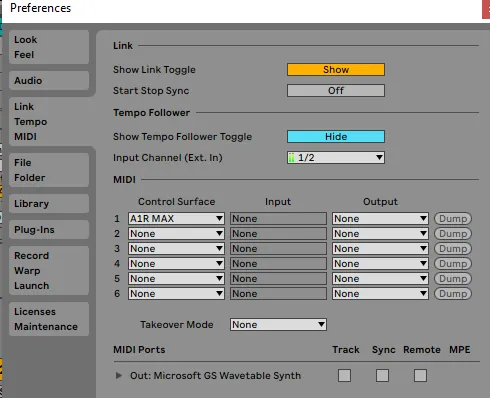
In Ableton: Preferences → Link/Tempo/MIDI → set Control Surface to A1R MAX, Input & Output = None.
If another control-surface script also grabs transport, it can conflict. A1R only needs the Control Surface slot — keep Input/Output on None.