
Setlist Files & Storage
Where your show lives, and how to move it around.
Per-project storage
ULTRA keeps everything about a show in an “A1R ULTRA” folder created next to your .als project file — the virtual setlist, lyrics, notes, mixer layout and other settings, each as its own file. Back up or move the project folder and the whole show comes with it. The Ableton project itself is never modified.
Save & Load a setlist
From the logo menu (click the ULTRA wordmark) you can:
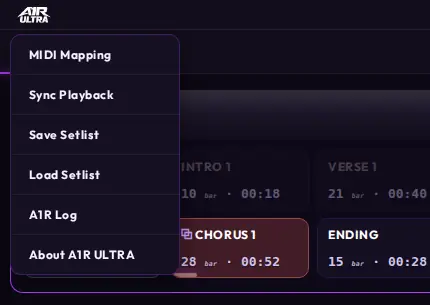
Click the wordmark — Save Setlist and Load Setlist live in the logo menu.
- Save the current virtual setlist to a single shareable file.
- Load a setlist file someone else sent you — their song order, skips, duplicates and loops apply to your copy of the project.
This is the easiest way for a band to keep everyone's machines on the same show.
Reaching the server
Besides http://localhost, ULTRA advertises itself on the network as http://a1r-ultra.local — handy for tablets and second laptops. Phones can also scan the QR code behind the top-left pill.
Auto-updates
ULTRA checks for updates in the background. When a new version is available, the tray icon offers the update and you get an OS notification — one click installs it. No manual downloads needed.