
ULTRA Mode
One switch decides who is in charge of your setlist.
The ULTRA pill in the top-right corner — lit violet when the virtual model is in charge.
ULTRA can run your show two ways, controlled by the ULTRA MODE switch:
| Switch | Behavior |
|---|---|
| ON | Pure virtual editing. The setlist is exactly what you see and edit in ULTRA. Typed naming rules in Ableton — +SKIP, +LOOP, >>> — are ignored; skips, loops and jumps come only from the virtual model. |
| OFF | Full MAX behavior. All MAX naming rules in your locator and clip names are honored, exactly as they would be in A1R MAX. |
In both modes Ableton itself is never modified — ULTRA only reads names and positions from your project.
MAX projects just work
If your project was prepared for A1R MAX, ULTRA reads its rules — skip colors and +SKIP, jump markers >>>, loop counts xN — as the baseline of the virtual setlist. Your ULTRA edits then layer on top of that baseline, so you can start from a working MAX show and refine it virtually.
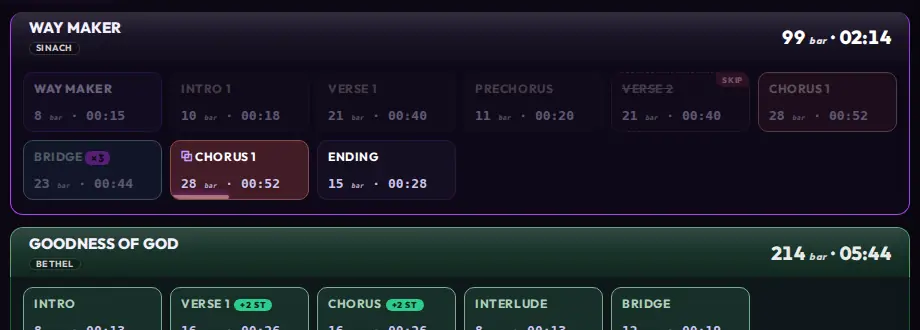
One lane, all the states: VERSE 2 skipped, BRIDGE looping ×3, and a duplicated CHORUS 1 currently playing.
Not sure which mode to use? Leave ULTRA MODE on and do all your show editing in Edit Mode — it keeps a single source of truth and gives you Undo/Redo for everything.